
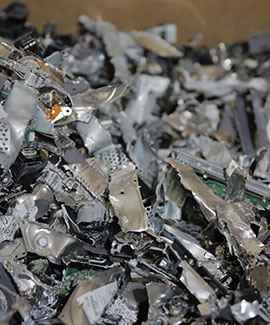
Wiping a hard drive doesn’t always erase your data. Deleting files or formatting a drive only removes the pointers to the data, and the data itself often stays recoverable with free software. Proper overwriting or cryptographic erase can work, but only if it is done and verified correctly. Physical destruction, such as industrial hard drive shredding, is the only method that makes recovery impossible and is easy to prove.
For businesses, the question is not just “is it gone?” It is “can we prove it is gone?” Regulations like HIPAA, GLBA and FACTA expect you to show that retired devices were properly sanitized. See our compliance page for details.
What Is the Difference Between Deleting, Formatting, Wiping and Destroying?
| Method | What it does | Is data recoverable? | Proof for auditors |
|---|---|---|---|
| Delete / empty trash | Removes file pointers only | Yes, easily | None |
| Quick format | Resets the file system | Yes, often | None |
| Overwrite (wipe) software | Writes new data over old data | Sometimes, if sectors are missed or the drive is an SSD | Software report, if verified |
| Degaussing | Erases magnetic media with a strong magnetic field | Not on HDDs; no effect on SSDs | Degausser log |
| Physical shredding | Cuts the drive into small fragments | No | Certificate of Destruction |
Why Are SSDs Harder to Erase Than Hard Drives?
Solid-state drives (SSDs), USB drives and phones store data on flash memory chips, not magnetic platters. To extend their life, SSDs spread data across hidden spare areas that the operating system cannot see or overwrite.
Wipe Software Can Miss Hidden Data
Standard overwrite tools only reach the storage the operating system can see, so copies of data in spare or reserved areas may survive.
Degaussing Does Nothing to Flash Memory
A degausser works by disrupting magnetic fields. Flash memory is not magnetic, so a degaussed SSD can still hold readable data.
Drilling a Hole Can Miss the Memory Chips
An SSD has several memory chips spread across its circuit board. A single drill hole can miss them entirely, leaving data intact. This is why many organizations send SSDs, cell phones and tablets straight to physical shredding.
What Does NIST 800-88 Say About Data Destruction?
NIST SP 800-88 is the main U.S. guideline for media sanitization. Revision 2 became final on September 26, 2025, and replaced the 2014 Revision 1 (NIST SP 800-88 Rev. 2). It keeps the same three levels of sanitization:
Clear
Overwriting data so it cannot be read with standard tools. Suitable for reuse inside your organization.
Purge
Stronger methods, such as cryptographic erase, that resist lab-level recovery attempts.
Destroy
Physically shredding, disintegrating or melting the media so it can never be read or reused. This is the highest level of sanitization.
Revision 2 also asks organizations to run a full sanitization program, not one-off fixes. That means tracking every device, choosing a method that fits the data’s sensitivity, and keeping records that prove it was done. Our post on policies and procedures covers how to put that in writing.
Is a Hammer or Drill Good Enough to Destroy a Hard Drive?
No. A hammer or drill can leave platters or memory chips readable, and it gives you no audit trail. It is also a safety hazard for staff. And be careful with “free” recycling offers, too. Read The Real Cost of “Free” Electronics Recycling and Recycled Doesn’t Always Mean Destroyed to learn why.
How Does Professional Hard Drive Shredding Work?
- Secure collection. Drives are placed in locked containers or picked up by DataShield staff.
- Chain of custody. Each item is tracked from your site to destruction.
- Shredding. Industrial shredders cut HDDs, SSDs, tapes and phones into fragments, either on-site at your location or at our secure plant. Compare options in on-site vs. plant-based shredding.
- Certificate of Destruction. You receive signed proof of what was destroyed and when.
- Responsible recycling. Shredded metals and electronics are recycled, never sent to landfill. Learn more about our e-waste responsibility.
See every step in our data destruction process. DataShield is NAID AAA certified and was the first company in Omaha with staff holding NAID’s Certified Secure Destruction Specialist credential.
Retiring Computers, Servers or Phones in Omaha, Des Moines or Colorado?
Whether you are replacing a few laptops or recycling a full office of computers, contact DataShield to schedule on-site or plant-based hard drive shredding. Before you pick a vendor, read How to Choose a Shredding Company in Omaha and Des Moines. And to know which files you can safely destroy, see How Long Should a Business Keep Records?
Frequently Asked Questions
Can deleted files be recovered from a hard drive?
Yes. Deleted and formatted files can often be recovered with free tools until they are overwritten or the drive is destroyed.
Does degaussing work on SSDs?
No. SSDs store data on flash chips, not magnetic media, so a degausser has no effect.
Is hard drive shredding NIST 800-88 compliant?
Yes. Shredding falls under NIST’s “Destroy” category, the highest level of media sanitization.
Can I watch my hard drives being destroyed?
Yes. With on-site shredding, drives are destroyed at your location so you can witness it.
What do I get as proof of destruction?
A Certificate of Destruction listing what was destroyed, when and how. Keep it with your compliance records. Find more answers in our shredding and data destruction FAQs.